SketchUp - Follow Me Tool
- Nov 14, 2022
- 1 min read
Updated: Nov 20, 2022
Session No. 3
During this session I learned new tool called 'Follow Me' that has countless useful possibilities! It was very exciting to create so many shapes and forms.
We started with creating different shapes - circles, triangles, hexagons, etc. follow line paths. Next one was learning how to carve simple and complex shapes from cubes and cuboids.


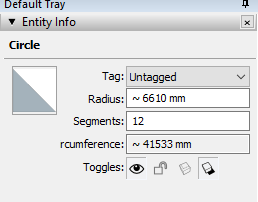
After that we learned to create shapes from circular base. In SketchUp > Entity Info window we can increase or decrease Segments count. By doing so we can make shape appear more smooth or angular.


In the end we combined everything we learned that day and created spherical stage and two spotlights by adding colour and decreasing opacity to our cones.




Comments